Digital Menus for Cafés in 2026: Trends & Tips
Digital menu trends for café owners in 2026: AI-written item descriptions, one-click multi-language translation, visual themes, table-specific QR codes and real-time campaigns have moved from nice-to-have to essential. This article walks through seven trends and gives concrete, actionable tips you can apply in your café right away.
The café sector has been in constant flux since 2020. Features like QR menus, multi-language support and AI translation are no longer "nice to have" in 2026 — they are non-negotiable. In this article we look at the 7 trends cafés should watch on the digital menu front in 2026.
1. AI-assisted product descriptions
Saying "Latte" isn't enough. "An Italian classic made with milk foam and espresso, its creamy texture delivering a morning boost" is far more appetizing. This copy used to be written by a copywriter. In 2026, an AI assistant generates a short, mouth-watering description within seconds once you type the product name. The menu owner then reviews and publishes it.
On QR Menu Link, the product-add screen has a "Generate description with AI" button. With a single click you create a description in Turkish, English or the language of your choice.
2. AI translation: 5 languages in one click
In tourist hotspots like Antalya, Bodrum, Cappadocia and Istanbul, cafés now have to display menus in more than one language. The traditional method: prepare the Turkish menu, hire a translator, then translate each item one by one. The new method: prepare the Turkish menu and click the "translate the whole menu into English" button.
In 2026, AI translations rival human translators in quality. Even so, you should review interpretive items like "Seasonal Salad"; AI may sometimes say "Season Salad" instead of "Seasonal Salad." Reviewing after translation is a 30-minute job, whereas translating from scratch takes days.
3. AI generation for category illustrations
Professional food photography is one of the expenses that intimidates café owners. A photo shoot takes a full day and is costly. In 2026, AI image generation solves this problem: you type "cappuccino on a rustic wooden board, top-down view, warm texture," and within minutes 4 different versions are produced.
This method is ideal especially for category card photos. Product photos should show the real thing, but a cappuccino illustration is enough for a category cover. On QR Menu Link, AI category image generation works right from the panel.
4. Table-specific QR codes
A single QR code opens the same menu at every table. That works, but the 2026 trend is table-specific QR codes: each table gets a different QR, and analytics then produce data like "Table 5's QR was scanned 17 times today."
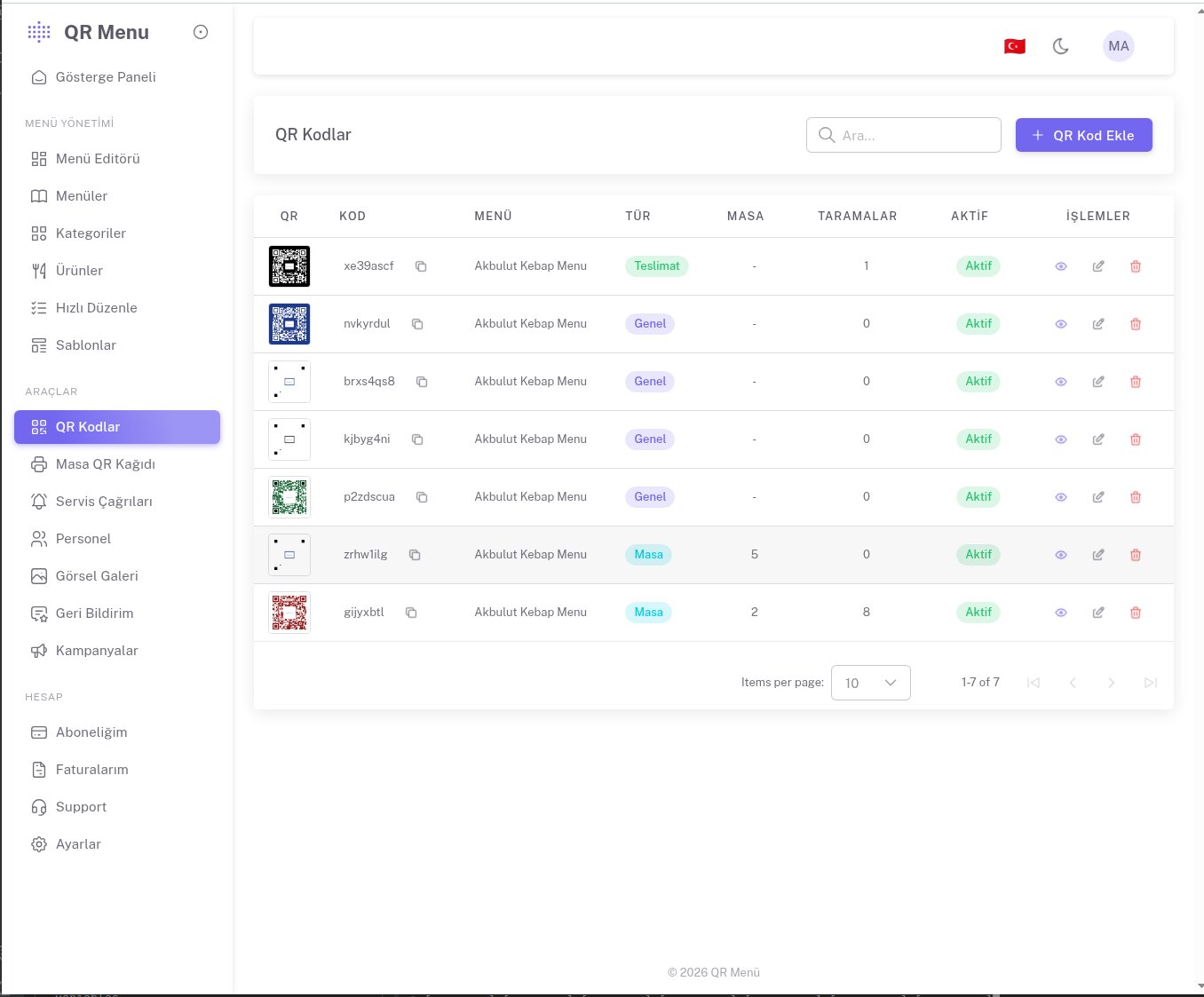
On top of this, when a customer taps "call waiter," staff see directly which table it came from. Instead of the waiter saying "I'm going to table 5," a "water requested from table 5" notification arrives.
5. Real-time campaigns with push notifications
The customer opens the menu, closes it, and drops the phone into their bag. Was it impossible for a "15% off all desserts today" campaign to reach them in the meantime? Not in 2026.
With push notifications, campaign alerts can be sent to customers who subscribed to the café's page after opening the menu. Naturally this method must be used carefully; one notification per week at most is the golden ratio.
6. Clean and fast designs
The first half of the 2020s ran on the logic of "the flashier the better." In 2026 the trend reversed: clean, fast, few colors, lots of white space. The customer should be able to scan the menu and decide within seconds.
QR Menu Link's template gallery has designs that capture this trend: the Minimal template is purely text-focused, Fast Cafe is optimized for fast ordering with dense information and minimal imagery, and Sticky Nav offers a fixed menu bar for cafés with many categories.
7. Data-driven menu layout
Traditional menu layout relies on intuition. Assumptions like "put desserts at the back so the customer thinks about them after choosing a main." In 2026, these hunches give way to data.
In the QR Menu Link panel, "average browse time" and "click rate" are visible for each category. If the desserts category gets very few clicks, maybe you need to move it up, update its photos, or refresh the dessert descriptions. Data decides instead of intuition.
Practical recommendations for 2026
- Your priority: have the menu ready in 5 languages. The number of foreign tourists rises every year.
- Photo investment: professional photos for your top 20 best-sellers. AI imagery or stock illustration for the rest.
- Test it: run a printed menu and QR menu side by side for two weeks and measure customer reaction.
- Train your staff: how to scan the QR code, how to help customers, and how the "call waiter" button works.
- Observe in the first month: highlight the most-clicked items and review the least-clicked ones.
Which template for which café?
- Third-wave coffee shops / boutique cafés → Cafe Banner or Photo Hero
- High-traffic chain cafés → Fast Cafe or Sticky Nav
- Brunch and breakfast spots → Cafe Banner or Classic
- Bar–café hybrid venues → Bar & Cocktails or Modern Dark
- Those who prefer clean, minimal design → Minimal or Square
To compete in 2026, a QR menu isn't a technical requirement — it's a business strategy. The right template + the right pricing + reading analytics correctly can lift the average order value per customer by 10–25%.